2026-04-30 · 4 min read
Why Garmin Connect only shows a status word
Garmin Connect is good at keeping Garmin accessories paired and updated, but for some heart-rate straps it may summarize battery as words such as OK, Fair, or Low instead of showing a precise percentage.
That is enough for most people. If you are testing gear, preparing for a long race, or just want to know the exact number before replacing a coin cell, the status word can feel too vague.
What MultiHR can read
MultiHR connects to devices that support the standard Bluetooth Low Energy heart-rate profile. For many chest straps, that means two useful services can be available:
0x180DHeart Rate Service for live heart-rate data.0x180FBattery Service for battery percentage.
When the strap exposes the 0x2A19 Battery Level characteristic, MultiHR reads it after connection and displays the value directly in the device card.
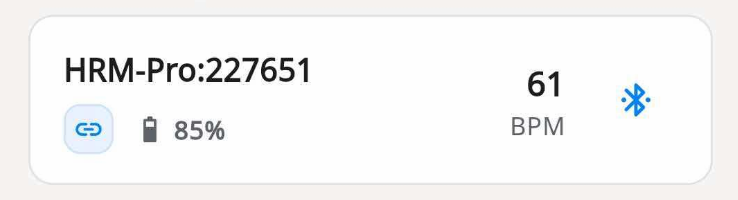
In this example, the Garmin HRM-Pro is connected through Bluetooth and MultiHR shows the battery as 85%.
How to check your Garmin HRM battery percentage
- Wear the heart-rate strap or wake it up so it starts advertising over Bluetooth.
- Open MultiHR on iOS or Android.
- Tap scan and find the Garmin strap in the nearby device list.
- Connect to the strap.
- Look at the connected device card. If the strap exposes battery information, MultiHR shows the percentage next to the battery icon.
You do not need to start a recording just to check the battery. A normal live connection is enough for MultiHR to read the battery service when the device provides it.
If the number does not appear
Not every device exposes the same BLE services in the same way. If the percentage does not show up, it usually means one of these things:
- The strap is not fully awake yet.
- Another app or watch is occupying the Bluetooth connection.
- The strap or firmware does not expose the standard BLE Battery Service to third-party apps.
In that case, reconnect the strap, keep it close to the phone, and close other apps that may be holding the connection. If MultiHR still cannot show a percentage, use the Garmin Connect status as the fallback.
Why this is useful
For casual use, OK is usually fine. For device testing, race-day preparation, or long recording sessions, a numeric value is easier to reason about. Seeing 85% tells you more than seeing OK, especially if you track how fast a strap drains over time.
MultiHR is not changing the strap or estimating the number from heart-rate data. It is simply reading the standard Bluetooth battery value when the device makes that value available.